
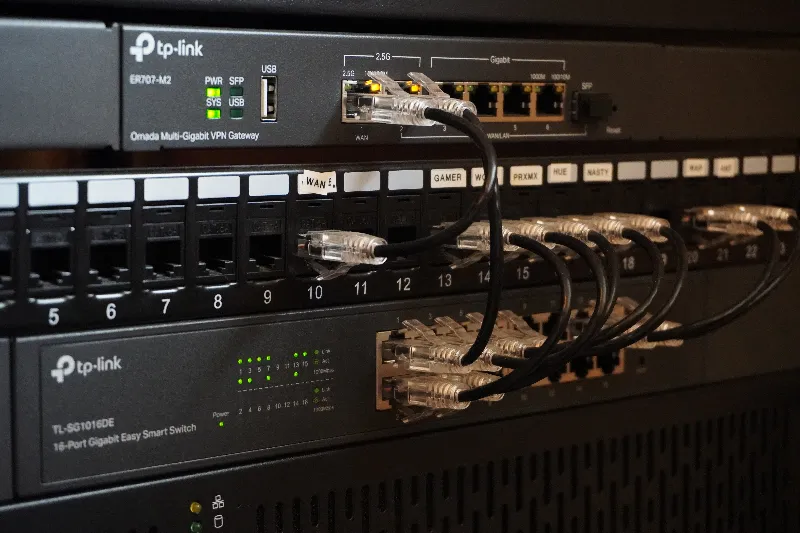
My homelab isn’t a miniature datacenter, and I’m not trying to turn it into one.
It’s a couple of servers, some networking gear, a UPS, and an increasingly long list of services that have accumulated over the years. Some of those services solve actual problems around the house. Others exist because I wanted to learn how something worked.
That’s really the point.
My homelab gives me somewhere to experiment with infrastructure, networking, storage, Docker, virtualization, monitoring, automation, and self-hosting without needing a business reason to do any of it.
It also happens to run a lot of things my household now relies on.
This is how it’s currently put together.
The homelab at a glance
Most of the physical infrastructure lives in a 15U open-air rack.
There are two main compute systems:
- Unraid is the always-on workhorse. It handles storage, most of my Docker containers, media, and several other services.
- Proxmox is the lab inside the lab. I use it for virtual machines, networking experiments, Docker testing, and anything I’d rather break somewhere other than my primary server.
Networking is built around TP-Link Omada hardware, and the important equipment is backed by a rack-mounted CyberPower UPS.
At a high level, it looks something like this:
Internet
   │
   ▼
Omada Router / Firewall
   │
   ▼
Managed Switch
   │
   ├── Unraid
   │     ├── Storage
   │     ├── Docker
   │     ├── Media
   │     └── Core services
   │
   ├── Proxmox
   │     ├── Ubuntu Server VM
   │     ├── Docker testing
   │     ├── Network lab
   │     └── Temporary VMs
   │
   ├── Wi-Fi Access Point
   │
   └── Other networked devices
The setup isn’t particularly exotic. That’s intentional.
I’d rather have hardware that does what I need reliably than add complexity just because I can.
Why I run a homelab
The obvious answer is self-hosting.
I run Plex. I host my own photo library. I have home automation, network services, monitoring, media automation, and a collection of smaller tools running across the environment.
But self-hosting is only part of why I keep a homelab.
The bigger benefit is having a real environment where I can learn.
There’s a big difference between reading about ZFS and actually maintaining a ZFS pool. Or understanding what a VLAN is and actually routing traffic between networks. Or reading Docker documentation and figuring out why a container suddenly can’t reach another service it depends on.
A homelab turns those concepts into real problems that need to be solved.
Over the years I’ve used mine to learn more about:
- Linux
- Docker and containers
- Virtualization
- Networking
- DNS
- Storage
- ZFS
- Reverse proxies and tunnels
- Monitoring
- Backups
- Service dependencies
- Home automation
- Hardware troubleshooting
And occasionally:
Why did everything work perfectly yesterday and absolutely nothing works today?
Those situations tend to be educational too.
The network underneath everything
The network is relatively simple.
My current core equipment is:
| Role | Hardware |
|---|---|
| Router / Firewall | TP-Link Omada ER707-M2 |
| Managed Switch | TP-Link TL-SG1016DE |
| Wireless AP | TP-Link Omada EAP610 |
The ER707-M2 handles routing and firewall duties, with the managed switch providing the wired backbone for the rack and other Ethernet devices.
Wireless is handled by an EAP610 Wi-Fi 6 access point.
I’ve increasingly become interested in the network side of the homelab because it’s where a lot of seemingly unrelated systems eventually meet.
Containers need DNS.
Servers need predictable addressing.
IoT devices don’t necessarily need access to everything else.
Services need to communicate with each other without exposing more than necessary.
Remote access needs to work without punching random holes through the firewall.
Once you start self-hosting more than a couple applications, the network stops being something underneath the servers and starts becoming part of the architecture itself.
Unraid is the workhorse
My primary server is a custom-built 4U Unraid system.
Its main jobs are:
NAS + Docker + media + always-on services.
The current hardware is:
| Component | Hardware |
|---|---|
| CPU | AMD Ryzen 7 3700X |
| Memory | 32GB DDR4 |
| Motherboard | Gigabyte B550M DS3H |
| GPU | NVIDIA GeForce GTX 1050 Ti |
| HBA | LSI 9211-8i |
| Chassis | 4U rack-mount |
| OS | Unraid |
The Ryzen 7 3700X gives me 8 cores and 16 threads, which has been plenty for the mixture of storage and container workloads I’m running.
The GTX 1050 Ti primarily exists for Plex hardware transcoding, although I’ve also experimented with using it for very lightweight local AI workloads.
Nothing about the build is especially cutting-edge.
That’s one of the things I like about it.
The storage array
Storage is one of the main reasons I originally gravitated toward Unraid.
My current array uses:
- 7 × 4TB WD Red drives for data
- 1 × 6TB WD Red Pro for parity
- 1.5TB of SATA SSD storage for cache
An LSI 9211-8i HBA running in IT mode handles additional disk connectivity and gives Unraid direct access to the drives.
The array is primarily bulk storage, particularly for media, while the SSD cache keeps Docker and frequently accessed application data responsive.
Unraid’s approach fits this system well because the individual disks don’t have to match.
That’s useful in a homelab where storage tends to grow more like this:
"I need more storage."

          ↓

"Here's another drive."

          ↓

Repeat indefinitely.
Proxmox is where I can break things
Sitting underneath the Unraid server in the rack is a 2U Proxmox system.
This machine has a very different job.
It’s my sandbox.
The hardware is mostly older equipment I already had:
| Component | Hardware |
|---|---|
| CPU | AMD Ryzen 5 1500X |
| Memory | 32GB DDR4 |
| Motherboard | MSI B350 Tomahawk |
| GPU | NVIDIA GeForce GT 730 |
| Networking | Dual-port Intel 2.5Gb NIC |
| Boot / VM Storage | 500GB SSD |
| Additional Storage | 1TB ZFS pool |
| OS | Proxmox VE |
The Ryzen 5 1500X isn’t exactly new, but that’s also the point.
A test server doesn’t need to be.
The machine has enough CPU and memory to run several lightweight VMs, experiment with different configurations, and give me an isolated environment without consuming newer hardware that would be better used elsewhere.
The lab inside the lab
One of my main Proxmox VMs runs Ubuntu Server and acts as a secondary Docker host.
I’ve also used the machine for networking experiments involving OPNsense, NIC passthrough, and Debian VMs sitting behind the virtual firewall.
That’s where Proxmox earns its place.
If I want to test a new Linux distribution, I can create a VM.
If I want to experiment with a network configuration, I don’t have to change the network my main server depends on.
If I want to test a Docker deployment, it doesn’t need to immediately land on the machine running the services I actually care about.
The distinction between my two servers is pretty simple:
Unraid runs things. Proxmox is where I figure things out.
That separation has become more valuable to me than having one giant server doing everything.
What I actually self-host
This is the part of a homelab that tends to get out of hand.
Once Docker makes deploying something take a few minutes, it’s very easy to look at an interesting project and think:
“I could host that.”
And then you do.
My current environment includes a mixture of services that I use regularly and others that exist because they’re useful infrastructure around those services.
Rather than list every container individually, it makes more sense to group them by what they’re doing.
Media
Media was one of the original reasons for building out the server.
Plex is at the center of that system, with the usual automation tools around it:
- Plex
- Sonarr
- Radarr
- Bazarr
- Prowlarr
- Seerr
- qBittorrent
- Tautulli
- Kometa
The interesting part isn’t really any individual application.
It’s how they work together.
A request can enter through Seerr, move through Sonarr or Radarr, get matched against indexers through Prowlarr, download through qBittorrent, and eventually appear in Plex.
Each piece solves one specific problem.
Together they create a system.
That’s one of my favorite parts of self-hosting.
A simplified version looks something like:
Seerr
  │
  ├──── Sonarr ────┐
  │                 │
  └──── Radarr ────┤
                    ▼
                 Prowlarr
                    │
                    ▼
               qBittorrent
                    │
                    ▼
                  Media
                    │
                    ▼
                   Plex
When something breaks, though, it also means figuring out which layer broke.
That’s where running these services becomes more useful than simply installing them.
Photos and personal data
I’ve also moved more personal data into services I control.
One of the bigger examples is Immich, which I use as a self-hosted photo platform.
Self-hosting something like a media server is relatively low stakes.
Photos are different.
They’re personal, difficult to replace, and something I actually care about keeping.
That changes how I think about the system behind the application.
The container itself is almost the least interesting part.
You also need to think about:
- Where the original files live
- Where application data lives
- What happens if a drive fails
- What happens if the application breaks
- What happens if you break the application
- How the data gets backed up
- Whether you could restore it without the original service
That’s one of the ways my approach to self-hosting has changed over time.
Getting a container running is easy.
Running it responsibly is the interesting part.
DNS, access, and infrastructure services
Some of the most important services in the lab are also the least exciting.
AdGuard Home handles network-level DNS filtering.
Cloudflare Tunnel provides external access to selected services without requiring me to expose them through traditional inbound port forwarding.
There are also supporting tools for monitoring, container management, notifications, and general administration.
These applications don’t tend to be the reason someone decides to build a homelab.
But once you run enough services, they become what makes the homelab manageable.
The more I’ve built out the environment, the more interested I’ve become in these supporting systems.
Deploying another application isn’t particularly difficult anymore.
Knowing whether it’s healthy, understanding what depends on it, securely accessing it, documenting it, and recovering it when something fails are much more interesting problems.
Monitoring what I’ve built
If a service silently fails and nobody notices for three days, monitoring would have been useful three days ago.
I use monitoring throughout the environment to give me some visibility into what’s actually running.
That includes application availability as well as things like Internet performance and infrastructure health.
The goal isn’t to build an enterprise monitoring platform in my house.
It’s to answer basic questions quickly:
- Is the application actually down?
- Is the server reachable?
- Is this a DNS problem?
- Is the Internet connection having problems?
- Did something change?
- Is this isolated to one service or affecting everything?
Those questions sound simple until something breaks.
Then they’re usually the first things I want answered.
Home Assistant and Zigbee
The homelab also extends beyond the rack.
Home Assistant runs as part of the environment and connects the server side of the lab to physical devices around the house.
For Zigbee devices, I’m using an SLZB-06M coordinator with Zigbee2MQTT.
That includes things like:
- Smart bulbs
- Switches
- Motion and presence sensors
- Temperature and environmental sensors
Home automation is another good example of why I like self-hosting.
A motion sensor triggering a light sounds trivial.
But underneath that one interaction might be a Zigbee device communicating with a coordinator, MQTT moving the event, Home Assistant evaluating an automation, and another device receiving a command.
You don’t need to understand any of that to turn on a light.
I just happen to enjoy understanding it.
Power matters too
The core networking and compute hardware is connected to a CyberPower CP1500PFCRM2U rack-mounted UPS.
Unraid monitors the UPS over USB.
A UPS isn’t the most interesting piece of homelab equipment, but it’s one of those purchases that makes more sense as the lab grows.
Once you’re running multiple services, storage arrays, networking equipment, and home automation, an unexpected power loss isn’t just a computer abruptly turning off.
It’s several interconnected systems shutting down at the same time.
The UPS gives them a much better chance of handling that gracefully.
I don’t self-host something just because I can
This is probably the biggest philosophical change in how I’ve approached the homelab.
Self-hosting can become ideological very quickly.
There’s a temptation to look at every subscription or cloud service and decide that you should replace it with something running in Docker.
I don’t think that’s always the right answer.
Running something yourself means you also own the problems that come with it:
- Updates
- Security
- Storage
- Backups
- Availability
- Troubleshooting
- Recovery
Sometimes that trade is absolutely worth it.
Sometimes paying someone else to worry about those things is the better choice.
I tend to self-host when doing so gives me something meaningful: more control, useful functionality, lower cost, privacy, flexibility, or an opportunity to learn.
If it only gives me another container to maintain, I’m much less interested.
The homelab is never really finished
I’ve rebuilt servers.
I’ve changed operating systems.
I’ve moved applications around.
I’ve replaced hardware.
I’ve changed networking equipment.
I’ve deployed services that became indispensable and others that disappeared a week later.
There isn’t really a final version.
That’s part of what makes a homelab useful.
It’s not a finished product. It’s an environment that changes as my interests and needs change.
Right now, Unraid handles most of the things I want to remain stable. Proxmox gives me somewhere to experiment. The network ties everything together, and the growing collection of supporting services makes the whole thing easier to operate.
Six months from now, some part of that will probably be different.
And I’ll probably have learned something while changing it.
What I’ve learned from running it
The most valuable part of the homelab isn’t Plex, the rack, Docker, or even the servers.
It’s the problems.
A failed container teaches you about logs.
A DNS issue teaches you how dependent everything is on DNS.
A bad network configuration teaches you about routing.
Storage problems make backup theory much less theoretical.
An application upgrade that suddenly breaks three other things teaches you about dependencies.
And eventually you stop seeing the lab as a collection of applications.
You start seeing the relationships between them.
That’s the part I find most interesting.
I like figuring out how things fit together — and whether they need to be complicated in the first place.
My homelab just gives me a very good place to keep doing that.