

For a while, I thought a good note-taking system needed structure.
Databases, properties, dashboards, templates, categories, relationships between pages. Basically all the stuff that makes a setup look really impressive in a screenshot.
So naturally, I used Notion.
And to be clear, I still think Notion is a good tool. The problem wasn’t really Notion.
The problem was me.
I kept building a better system for taking notes instead of actually taking notes.
Eventually, maintaining everything became enough of a chore that I stopped using it consistently. That was a pretty good sign that something needed to change.
I moved to Obsidian, simplified almost everything, and haven’t really looked back.
A note-taking system isn’t very useful if maintaining the system becomes more work than taking the notes.
I didn’t need another productivity system
One of the things I liked about Notion was how much I could do with it.
It was also the exact thing that got me into trouble.
A basic page could become a database. That database could have multiple views. Then I could add properties, relationships, filters, templates, dashboards, and whatever else I convinced myself would make the system more useful.
And building all of that felt productive.
But when I actually needed to quickly write something down, I had created friction for myself.
Where does this go?
Which database should it be in?
What properties does it need?
Should this be its own page or part of something else?
None of those questions were helping me remember the thing I was trying to write down.
Why Obsidian clicked for me
Obsidian starts from a much simpler place.
A note is just a Markdown file.
packing-list.md
obsidian-article.md
Obsidian adds a great interface around those files, but the underlying information remains simple.
That matters to me.
I generally prefer technology that gives me control over the important parts of the system without adding complexity just for the sake of having more features.
Obsidian itself isn’t open source, but my notes aren’t locked into some Obsidian-specific database. They’re standard Markdown files stored in a folder I control.
If I decide tomorrow that I don’t want to use Obsidian anymore, I still have all of my notes.
I can open them in VS Code, or any other Markdown editor, or practically anywhere else.
The application can change without taking my information with it.
My folder structure is pretty boring
And that’s intentional.
My vault has folders for the broad areas where I keep information, but I don’t expect the folder hierarchy to perfectly describe every relationship between every note.
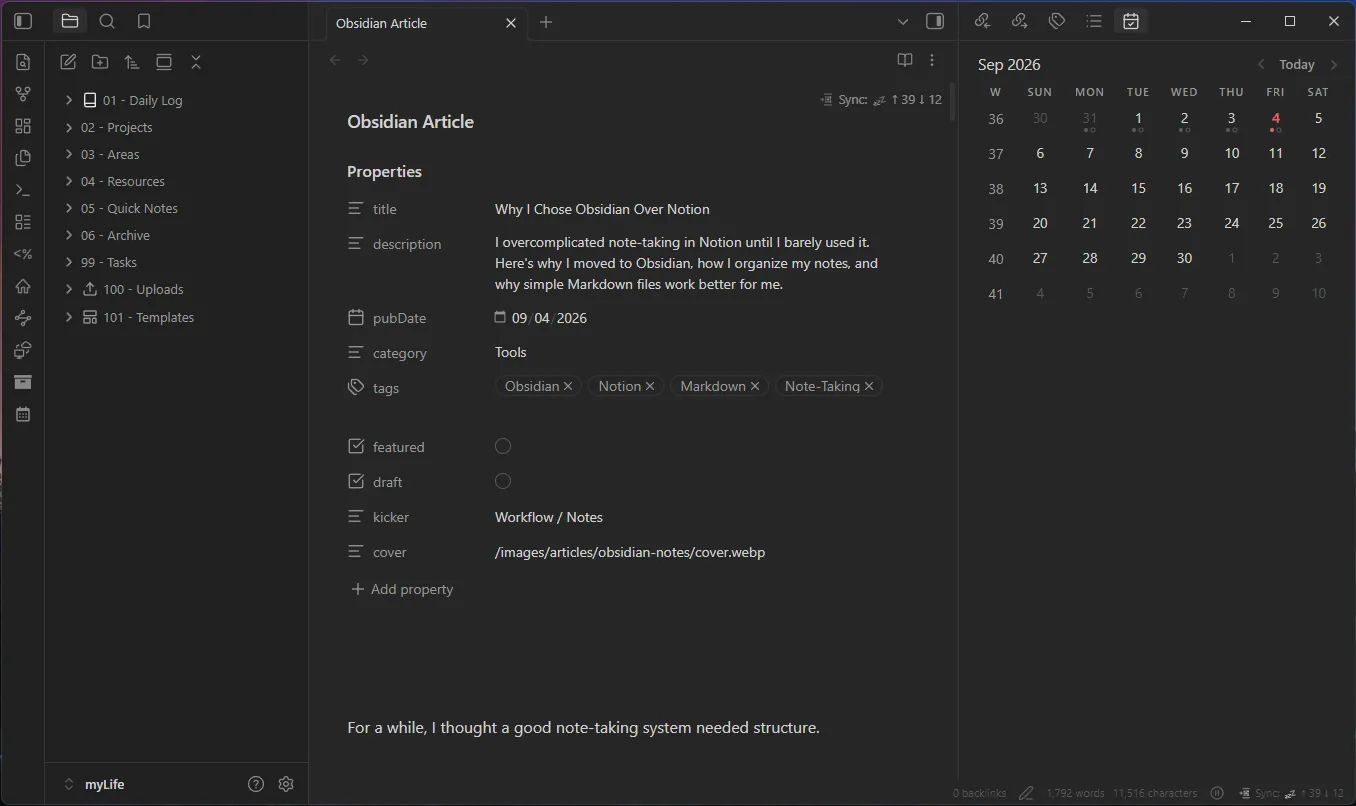
The basic structure of my vault still takes some inspiration from PARA:
- Projects for things with an actual outcome I’m actively working toward
- Areas for ongoing parts of my life or responsibilities
- Resources for information I want to keep and reference
- Archive for things that aren’t active anymore but are still worth keeping
I like the idea behind PARA because the categories are broad enough to stay useful.
What I don’t want is to turn PARA into another system I have to maintain perfectly.
So my version is pretty laid back.
If I only have a couple real projects going on, the Projects folder can be almost empty. That’s fine for me.
I don’t need to invent projects just so that part of the framework gets used.
Areas tend to be more useful for me because a lot of what I keep notes about is ongoing. Things like my homelab, websites, personal systems, and other parts of life don’t necessarily have a defined finish line.
Resources are useful for information I may want later but don’t need to associate with something active.
And Archive gives me somewhere to move old material instead of either deleting it or leaving inactive notes mixed in with everything else.
Quick Notes is intentionally messy
One of my favorite parts of the setup is my Quick Notes folder.
It’s basically an inbox.
If I need to write something down and don’t immediately know where it belongs, it goes into Quick Notes.
If I create something from my phone, it can go there.
If I have an idea that might become something larger later, it goes there.
If I’m researching something and just need somewhere to dump information for a few minutes, that’s fine too.
The point is that organization never gets in the way of capturing something.
Capture first. Organize later.
Eventually, I’ll go through those notes.
Some get moved somewhere more permanent.
Some turn out to be completely useless and get deleted.
That’s exactly what the folder is there for. It doesn’t need to be clean.
The rest of the vault can stay organized because I have somewhere that doesn’t have to be.
I don’t want to build a “second brain”
There are some wild Obsidan setups out there.
Dashboards. Databases. Automated workflows. Elaborate tagging systems. Huge plugin collections. Visual graphs covering thousands of interconnected notes.
There’s nothing inherently wrong with any of that. If it solves a problem for you, use it.
But I know myself well enough at this point to know where that road goes.
I’d spend a weekend building the perfect Obsidian dashboard, use it for three days, decide I need to improve something, rebuild half of it, and eventually end up maintaining another system.
That’s exactly what I was trying to get away from.
I want a reliable place to put information I don’t want to lose.
That’s a much less exciting goal, but it’s a lot more useful to me.
Links are useful when there’s actually a connection
One of Obsidian’s defining features is the ability to link notes together.
See also: [[Homelab Overview]]I use that when it makes sense, but I don’t try to turn every note into part of some giant web of interconnected knowledge.
If I’m writing about one part of my homelab and another note provides useful context, I’ll link it.
If two notes aren’t meaningfully related, I don’t.
Simple.
Backlinks are useful for the same reason. I can see where another note has been referenced without having to manually keep track of everything.
The feature is there when I need it, but it doesn’t dictate how I organize the entire vault.
Search is part of the organization system
I think this is something I underestimated when I used more complicated setups.
Not everything needs to be perfectly categorized if search works well.
If I remember a phrase, a service name, a project, or even roughly what I wrote about, there’s a good chance I can find the note without caring exactly where I filed it.
That changes the goal of organization.
I’m not trying to build a flawless taxonomy.
I’m trying to make information retrievable.
Those aren’t necessarily the same thing.
I use Obsidian on my phone too
The one caveat to Obsidian and it being just markdown files, is that each database is just a folder on a specific device. My database vault is on my computer, I would need to replicate it on my phone to have access to it there, otherwise that kinda defeats the purpose of having a note-taking system.
Thankfully, Obsidian offers a paid service called Obsidian Sync to do this automatically.
However, I use LiveSync as a free alternative to Obsidian Sync. But honestly, Obsidian Sync is probably worth the cost if you dont want to deal with the setup and maintenance of LiveSync.
That makes Quick Notes even more useful.
Have an idea
    ↓
Open Obsidian on my phone
    ↓
Drop it into Quick Notes
    ↓
LiveSync
    ↓
It's waiting on my computer later
    ↓
Organize it when I actually have time
I don’t have to text myself and add the note to my vault later.
I don’t have to put it in some temporary notes app and remember to copy it later.
And I don’t have to decide exactly where something belongs while I’m standing in a grocery store.
I just write it down.
That’s the kind of feature that actually changes whether I use a system consistently.
Plain Markdown is probably my favorite feature
This is technically one of the least exciting things about Obsidian, but I think it’s one of the most important.
A note can look like this:
# Proxmox Notes

## Networking

Management traffic is separated from other services.

## Storage

ZFS handles the primary VM storage pool.

## Things to revisit

- Backup retention
- SMART monitoring
- UPS integration
There’s nothing particularly special about that file.
And that’s the point.
It’s plain text.
Obsidian can disappear and the file still makes sense.
That gives me a lot more confidence in putting years of information into the system.
I’ve become increasingly skeptical of tools where getting information into the platform is effortless but getting it out later becomes a project.
My notes should outlive the application I happen to be using to edit them.
Plugins have to earn their place
Obsidian has a huge plugin ecosystem, which means it’s very easy to recreate the same complexity I was trying to escape.
So I try to be selective.
My rule is basically:
If I can’t explain what problem a plugin solves, I probably don’t need it.
LiveSync solves a real problem.
It lets me use the same vault across the devices where I actually take notes.
That’s useful.
Installing fifteen plugins because somebody’s Obsidian setup looked cool on Reddit isn’t.
I’m not against customization. I just don’t want customization itself to become the project.
Notion is still better at some things
None of this means I think everyone should move from Notion to Obsidian.
They’re different tools, and there are plenty of situations where I’d choose Notion.
If I were building a collaborative workspace for a team, Notion would probably be much more appealing.
It handles structured databases, shared information, project tracking, and collaboration in ways that make a lot of sense for that use case.
My Obsidian vault is primarily mine.
It’s my technical notes, ideas, documentation, research, reference material, and whatever else I want to remember.
For that, I’d rather have files.
The mistake I made wasn’t choosing Notion.
It was trying to solve a simple problem with a much more complicated system than I actually needed.
The best system mostly disappears
I used to judge productivity tools by how much they could do.
Now I care a lot more about how little I have to think about them.
For note-taking, I really need the system to do three things well:
- Let me write something down.
- Let me find it later.
- Let me update it when the information changes.
Anything beyond that needs to justify the additional friction.
That’s why Obsidian has stuck for me.
My notes are files I control.
The folder structure is simple.
Quick Notes gives me somewhere to capture things without thinking.
LiveSync makes the same system useful from my phone.
And when I need more functionality, Obsidian gives me plenty of room to add it without requiring that complexity from the start.
Most importantly, I actually use it.
I don’t want to spend my time maintaining a second brain.
I just want a reliable place to put information I don’t want to lose.